Multithreaded Banking
Source code can be found here, but most of it can be found in the report below :) As you’ll read in the introduction, this is just report was coursework for one of my modules, hence the very formal writing.
Introduction
This report documents the requirements, design, implementation and testing of a client-server banking system for CS3004 coursework assignment. It will demonstrate my understanding of the main issues related to network computing, ability to critically evaluate requirements and problems when designing and implementing network computing applications.
Requirements
Create a client-server banking system that has allows for three client applications (A, B and C) to connect to a single, multi-threaded server that manages the client’s three operations: adding money, subtracting money and transferring money between accounts. The server must store three values (each starting at 1000 units) for each client with locking functionality to stop concurrency issues (lost updates, dirty reads, etc) and it must be multi-threaded to allow for multiple clients to connect at the same time. The server must produce logs to prove client requests have been processed.
Design
This section will discuss how the design aspects including the architecture, protocol and client interaction.
Client-Server Architecture
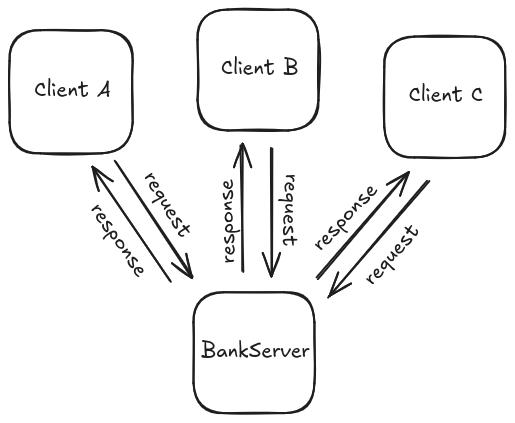
This banking system will follow the client-server architecture which is a model which contains servers which manage, store and provide data or services and the clients request the services or data from the server(s). As seen in the diagram below, the banking system will allow three clients to access a single server, sending commands (requests) and receiving confirmation responses. The server and clients will use the TCP/IP transmission protocol to send and receive reliable packets via Java’s standard java.net libraries (Socket and ServerSocket).
Protocol Table
Below is the protocol table which describes the messages that are sent between the parts of the banking system. As the requirements state, multiple clients should be able to connect to the server at once so the table has been split into BankServer, the main server, and BankThread, an individual thread that manages a unique BankClient.
| BankClient | BankThread | BankServer |
|---|---|---|
| [Run BankServer] | ||
| [Run BankClient] | ||
| WHILE NOT TERMINATED | ||
| [accept BankClient connection] | ||
| [successsful connection] | [BankThread started] | [start BankThread for connected BankClient] |
| WHILE NOT TERMINATED | WHILE NOT TERMNIATED | |
| SEND command TO BankThread | ||
| RECIEVE command FROM BankClient | ||
| IF command IS VALID | ||
| [process command] | ||
| response = [command completion confirmation] | ||
| ELSE | ||
| response = [command is invalid] | ||
| END IF | ||
| SEND response TO BankClient | ||
| RECIEVE resonse FROM BankThread | ||
| END WHILE | END WHILE | END WHILE |
Client Usage
As the client initiates communication, client will be able to send three valid commands:
add [value]
Adds value to the clients own account
subrtact [value]
Subtract value from the clients own account
transfer [value] [account]
Transfer value from clients own account to specified account in argument
Valid arguments:
[value] is a positive double
[account] is a case-insensitive valid account (A, B, or C)
Implementation
This section will cover how all the key elements were implemented for the banking system.
Server Start / Socket Opening
In the try-catch, the server socket tries to open port 4444 to TCP/IP connections using which allows clients to be able to connect to the server. If failed, sends an error and exits. This code snippet also shows the initialisation of SharedBankState which sets the private double array which stores the account values.
ServerSocket bankSeverSocket = null;
boolean listening = true;
int socketNumber = 4444;

double[] accounts = { 1000, 1000, 1000 };
SharedBankState bankState = new SharedBankState(accounts);

try {
	bankSeverSocket = new ServerSocket(socketNumber);
} catch (IOException e) {
	System.err.println("Could not start BankServer on socket " + socketNumber);
	System.exit(-1);
}
System.out.println("BankServer started on socket " + socketNumber);
Server Accepting Connections / New Thread Creation
After the server is successfully started, it will enter an infinite loop where it will check to see if a new client has requested to make a connection. Once a client makes a connection attempt, a new thread will be created to handle the client while assigning it’s account: A, B, or C (depending on the previous connection). This could be improved by the client specifiying which account it should be assigned to before connection.
while (listening) {
	// could identify the client when it connects to the server
	new BankServerThread(bankSeverSocket.accept(), "A", bankState).start();
	new BankServerThread(bankSeverSocket.accept(), "B", bankState).start();
	new BankServerThread(bankSeverSocket.accept(), "C", bankState).start();
}
The client tries to create a connection with the server socket with “new Socket()”. In this example, the hostname is “localhost” as the client and server run on the same system but a different hostname could be specified if the server is ran on a different system. If the connection is accepted, the input and output streams are connected to the server to allow for text to be sent between the client and server.
Client Init / Connection Request
int socketNumber = 4444;
String hostname = "localhost";
String clientID = "";

try {
    bankSocket = new Socket(hostname, socketNumber);
    in = new BufferedReader(new InputStreamReader(bankSocket.getInputStream()));
    out = new PrintWriter(bankSocket.getOutputStream(), true);
} catch (UnknownHostException e) {
    System.err.println("Don't know about host: " + hostname);
    System.exit(1);
} catch (IOException e) {
    System.err.println("Couldn't get I/O for the connection to: " + socketNumber);
    System.exit(1);
}

BufferedReader stdIn = new BufferedReader(new InputStreamReader(System.in));
String fromServer;
String fromUser;

System.out.println("Initialised " + clientID + " client and IO connections");
Client Input Loop
Once connected with the server, reading clients input is initalised and the client enters an infinite loop of trying to read the client’s input. If the user has an input, it is sent to the server (along with logging to confirm transfer) and prints the servers response once received.
BufferedReader stdIn = new BufferedReader(new InputStreamReader(System.in));
String fromServer;
String fromUser;

System.out.println("Initialised " + clientID + " client and IO connections");

while (true) {
    fromUser = stdIn.readLine();
    if (fromUser != null) {
        System.out.println("Client " + clientID + " sending: \"" + fromUser + "\" to BankServer");
        out.println(fromUser);
    }
    fromServer = in.readLine();
    System.out.println("Client " + clientID + " received: \"" + fromServer + "\" from BankServer\n");
}
Mutex Lock
A mutex (mutual exclusion lock) ensures that only one thread can access the shared state object which eliminated issues like dirty reads. When a thread tries to access the shared data (account values for the banking system), it will try to acquire the lock, if no other thread is accessing it, it will be given the lock and be allowed to access and modify the data. If a thread tries to access the data while it’s locked, it will wait until the thread releases the lock.
public synchronized void acquireLock() throws InterruptedException {
	Thread me = Thread.currentThread(); // get a ref to the current thread
	System.out.println(me.getName() + " is attempting to acquire a lock!");
	while (accessing) { // while someone else is accessing or threadsWaiting > 0
		System.out.println(me.getName() + " waiting to get a lock as someone else is accessing...");
		// wait for the lock to be released - see releaseLock() below
		wait();
	}
	// nobody has got a lock so get one
	accessing = true;
	System.out.println(me.getName() + " got a lock!");
}

public synchronized void releaseLock() {
	// release the lock and tell everyone
	accessing = false;
	notifyAll();
	Thread me = Thread.currentThread(); // get a ref to the current thread
	System.out.println(me.getName() + " released a lock!");
}
Validating Client Input
Regex was used to verify if the clients input was valid to allow for both capitalised and non-capitalised commands to be valid (along with account name). I used [0-9] instead of \d because Java requires two escape chars (\\d) so it was even more unreadable than it currently is but it simply checks if it’s a valid command as stated previously.
Functions that execute the clients commands, interacts with the global private shared accounts array after acquiring the lock. “accounts” is the private global array of values for accounts.
public boolean validInput(String input) {
	String pattern = "([Aa]dd ([0-9]+|[0-9]+\\.[0-9]+))|([Ss]ubtract ([0-9]+|[0-9]+\\.[0-9]+))|([Tt]ransfer ([0-9]+|[0-9]+\\.[0-9]+) [A-C|a-c])";
	return input.matches(pattern);
}

public boolean validThreadName(String input) {
	return input.matches("[ABC]");
}
Client Operation (add_money, subtract_money, transfer_money)
Functions that execute the clients commands, interacts with the global private shared accounts array after acquiring the lock. “accounts” is the private global array of values for accounts.
public int accountToIndex(String account) {
	switch (account) {
		case "a":
		case "A":
			return 0;
		case "b":
		case "B":
			return 1;
		case "c":
		case "C":
			return 2;
		default:
			return -1;
	}
}

public synchronized void add_money(String account, double value) {
	accounts[accountToIndex(account)] += value;
}

public synchronized void subtract_money(String account, double value) {
	accounts[accountToIndex(account)] -= value;
}

public synchronized void transfer_money(String account1, String account2, double value) {
	if (account1.equals(account2)) {
		return; // doesn't need to exist but would help if state was persistent and program
				// crashed after subtract
	}
	subtract_money(account1, value);
	add_money(account2, value);
}
Process Client Input
Function that processes the client input by validating the input, ensuring the thread was correctly initalised and if both pass, evalutates which command the client has sent and executes it. After execution the server responds to the clients request (command) by confirming it’s result. Also prints all accounts for server logs.
public synchronized String processInput(String clientName, String input) {
	String outputToClient = null;

	if (!validInput(input)) {
		outputToClient = ("ERR: Invalid command entered");
	} else if (!validThreadName(clientName)) {
		outputToClient = ("ERR: Wrong threadname/clientname");
	} else {
		String[] arguments = input.split(" ");
		double value = Double.parseDouble(arguments[1]);

		if (arguments[0].matches("[Aa]dd")) {
			add_money(clientName, value);
			outputToClient = value + " units have been added to " + clientName;
		} else if (arguments[0].matches("[Ss]ubtract")) {
			subtract_money(clientName, value);
			outputToClient = value + " units have been subtract to " + clientName;
		} else if (arguments[0].matches("[Tt]ransfer")) {
			String toAccount = arguments[2];
			transfer_money(clientName, toAccount, value);
			outputToClient = value + " units have been transfered from " + clientName + " to " + toAccount;
		} else {
			// shouldn't be possible as input has been validated
			System.out.println("ERR: Developer made oopsie");
		}
	}

	// return the output message to the BankThread
	System.out.println("Server sending: \"" + outputToClient + "\" to " + clientName);
	System.out.println(getAccounts());

	return outputToClient;
}
Bank Thread
Started when the client tries to connect to the server, continues the connection process by connecting to the client’s I/O streams and when a request from the client is received, the thread tries to acquire a lock, process the request, and release the lock upon completion.
public void run() {
	try {
		System.out.println(clientName + " initialising.");
		BufferedReader in = new BufferedReader(new InputStreamReader(bankSocket.getInputStream()));
		PrintWriter out = new PrintWriter(bankSocket.getOutputStream(), true);
		String inputLine, outputLine;

		while ((inputLine = in.readLine()) != null) {
			// Get a lock first
			System.out.println("Server recieved: \"" + inputLine + "\" from " + clientName);
			try {
				bankState.acquireLock();
				outputLine = bankState.processInput(clientName, inputLine);
				out.println(outputLine);
				bankState.releaseLock();
				System.out.println();
			} catch (InterruptedException e) {
				System.err.println("Failed to get lock when reading:" + e);
			}
		}

		out.close();
		in.close();
		bankSocket.close();

	} catch (IOException e) {
		e.printStackTrace();
	}
}